Tiny Rooms Design And Decorate Updates & Patch Notes
Launch timeline, theme seasons, and what to recheck after each studio drop.
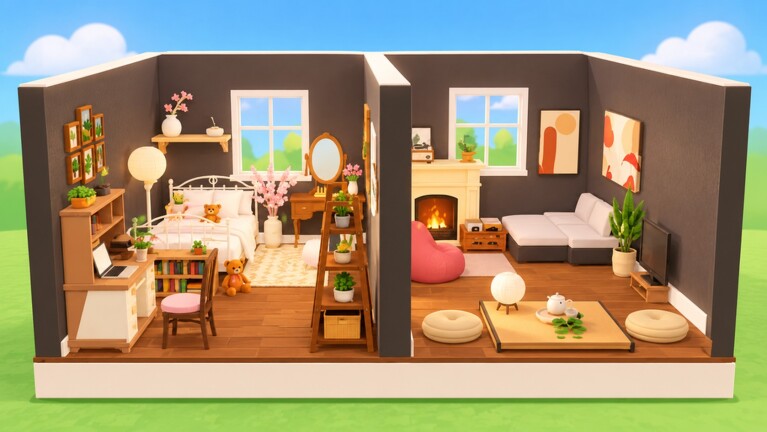
Track Tiny Rooms: Design And Decorate patches here. OrchardField Studios released the Roblox experience on 26 October 2026. In its first stretch the place climbed toward roughly 500k visits with a clear pitch: soft, theme-based tiny-room decorating, recolors, neighbor visits, and cosy voting in servers capped around twelve players. This hub summarizes the launch baseline, how theme seasons tend to roll, and what you should re-test after every studio post.
Launch baseline (26 October 2026)
At launch, Tiny Rooms established the loop players still practice today:
- Spawn into a compact empty room
- Receive a cozy domestic theme for the round
- Decorate with furniture you can recolor—including rugs and lamps
- Visit other rooms, then vote; cosiest readable builds rise
- Progress through play to earn free spins on level-up and expand the catalog
Genre tagging sits in Simulation / Tycoon-adjacent discovery, but the feel is closer to a social design lobby than a classic tycoon grind. Free-to-play access means the barrier is skill and taste, not a paywall to enter a round.
Theme seasons and cozy catalog direction
OrchardField leans into soft colour stories rather than pure horror or PvP seasons. Community and trailer language highlight prompts such as:
- Autumn bedrooms with warm textiles
- Grandma’s living room nostalgia clusters
- Snug attics with intimate lighting
- Balcony rooms bridging indoors and outdoors
- Two-storey loft experiments on a still-tiny footprint
November 2026 seasonal watch: studio communication has pointed at broader winter cozy interest. Prepare cream, pine, ember-lamp, and soft-neutral palettes, but confirm banners and furniture in the live Tiny Rooms client. Read the dedicated Winter Cozy Season Watch for preparation steps, post-update checklists, and how to separate Tiny Rooms features from adjacent studio experiments.
When a seasonal drop lands, expect new recolor targets, lighting kits, and maybe limited rugs that redefine what “soft” means for a month. After each drop, run one learning round before you chase podium finishes—see the guides hub and furniture tier list for how to absorb new pieces without wrecking your palette.
How OrchardField tends to communicate
Watch the OrchardField Studios group for shouts about “big new update” style posts, feature lists, and apology notes when a theme arrives slightly early because of real-life scheduling. Also refresh the official game page description and our links hub. Promo codes sometimes ride along with patch marketing—verify them on the codes hub and redeem via how to redeem.
Studio posts may mention adjacent feature experiments (deeper customization, house ownership fantasies, NPC visitors, quests, winter themes, or other studio-wide ideas). Treat every bullet as “confirm in your live client” before you rewrite your personal strategy—especially claims that may belong to adjacent experiments rather than Tiny Rooms itself. Details and a winter prep checklist live on Winter Cozy Season Watch.
Post-update checklist for players
- Boot once on a low-stakes round — confirm placement, recolor UI, and voting still feel normal.
- Scan new furniture — mark which pieces recolor softly; park loud outliers.
- Retest lighting — new lamps can wash out old rug choices under amber light.
- Recheck codes and group gifts — patch days are prime time for temporary strings.
- Assume scripts broke — client tools on the scripts hub often fail after Roblox or place updates; decorating skill does not.
- Update your toolkit notes — refresh the tools hub checklist if themes shift (for example, winter textiles vs autumn leaf palettes).
What we log on this hub going forward
Each major patch entry should eventually include: date, headline features, new themes or furniture families, known bugs, and whether codes launched. Until OrchardField publishes denser patch blogs, we synthesize from group shouts, in-game observation, and verified player reports. We will not invent patch numbers or fake changelogs.
Why updates matter for voters and builders
Meta taste shifts when a new fluffy rug family or loft stair kit arrives. S-tier advice on the furniture list can slide if a better soft sofa ships. Creators on the players hub often showcase patch furniture first—watch their doorway shots before you copy a full layout.
Stay patient on day-one patch lag, keep voting fair while everyone experiments, and return here after every OrchardField announcement so your cozy strategy stays current.
Frequently Asked Questions
Quick answers for Tiny Rooms Design And Decorate players.
When did Tiny Rooms Design And Decorate release?
OrchardField Studios released the Roblox experience on 26 October 2026.
Where are official update announcements posted?
Primarily the OrchardField Studios Roblox group shouts and the game page. This hub summarizes verified changes for players.
Do updates add new cozy themes?
Yes. The game’s identity is rotating domestic cozy themes—autumn rooms, attics, balconies, lofts, and seasonal twists. Watch the Winter Cozy Season page for November 2026 prep and in-client verification.
Should I recheck codes after a patch?
Yes. Patch marketing often includes temporary promo codes. Verify on the Codes hub before redeeming.
Why did my script stop working after an update?
Place and client changes frequently break injected tools. Assume breakage and rely on legitimate decorating practice instead.