Tiny Rooms Design And Decorate Winter Cozy Season Watch (Nov 2026)
How to prepare soft winter palettes and verify live client features after OrchardField seasonal communication.
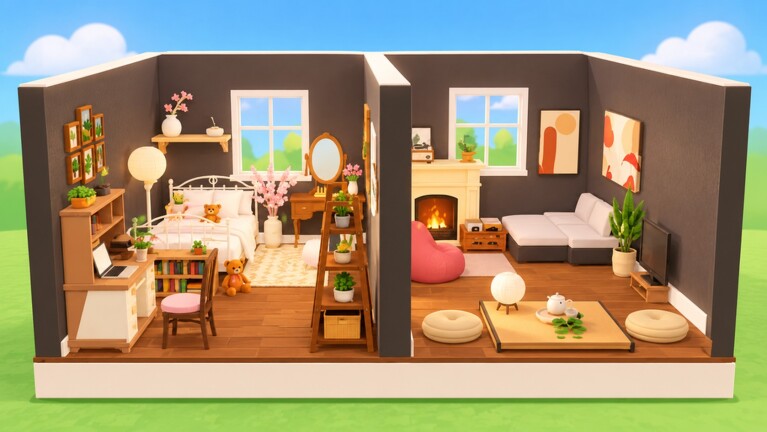
OrchardField Studios has signaled broader seasonal interest around winter cozy directions in late 2026 studio communication. For Tiny Rooms: Design And Decorate—the free-to-play Roblox decorating game released 26 October 2026—players should treat winter themes as a likely cozy pivot while confirming every feature in the live client. Soft colours, warm lamps, and fluffy rugs already define the game; a winter season extends that language toward cream, pine, ember light, and quiet neutrals rather than sudden neon.
This page is a preparation and verification guide, not a fabricated changelog. It sits under the Updates hub, pairs with Theme Design Tips for palette craft, reminds you to recheck Codes after patches, and points to Official Links for group shouts and the Roblox place page.
What we know versus what to verify
Known baseline for Tiny Rooms: theme-based tiny-room decorating, recolors, neighbor visits, cosy voting, servers up to about twelve players, free spins on level-up, and domestic cozy prompts such as autumn bedrooms, Grandma living rooms, snug attics, balcony rooms, and two-storey lofts.
Studio-wide posts may mention winter themes alongside adjacent experiments such as deeper customization ideas, house-ownership fantasies, NPC visitors, quests, or even nail-design style features in other OrchardField contexts. Do not assume those bullets are live Tiny Rooms systems until you see them inside the Tiny Rooms place itself. Adjacent experiments can be studio roadmap language, other experiences, or early concepts.
Player rule: if it is not in your Tiny Rooms client, it is not part of your round strategy yet.
November 2026 seasonal direction (cozy winter)
Heading into and through November 2026, the practical seasonal watch for Tiny Rooms players is:
- Expect soft winter textile language if a seasonal drop lands (creams, pines, ember lamps)
- Expect catalog additions that still need recolor discipline
- Expect possible promo chatter around patches—verify strings on the Codes hub before redeeming
- Expect day-one lag or UI quirks; run a low-stakes learning round first
We will not invent patch numbers, fake furniture names, or claim nail salons / owned houses are Tiny Rooms features without confirmation. When OrchardField ships a clear Tiny Rooms winter pack, this wiki will update with observed pieces and theme prompts.
Prepare cozy winter palettes now
You can practice winter cosiness with the current recolor tools even before a dedicated drop.
Core winter cozy family:
- Cream and warm white for large planes and bedding
- Pine or muted forest green as a support soft (not neon evergreen)
- Ember and parchment lamp shades for evening glow
- Soft neutrals (taupe, oatmeal, gentle grey-beige) for rugs and secondary seats
- Warm wood as the material accent; soft brass sparingly
Doorway story goals:
- One clear focal (sofa nest or dressed bed) lit by warm lamps
- One fluffy rug in oatmeal or soft pine-adjacent neutrals
- Limited clutter so winter softness reads as calm, not storage
Avoid: icy pure cyan walls, RGB holiday spam, and five competing “festive” hues that fight the soft Tiny Rooms brand.
Detailed soft-palette workflow lives in Theme Design Tips and the recoloring guide under Guides. Winter is still a short-palette problem: two or three soft colours plus wood or metal accent.
Post-update checklist for seasonal patches
When a shout or game-page edit hints at winter content:
- Boot a learning round — confirm placement, recolor, visit, and vote still feel normal.
- Scan new furniture — mark which pieces recolor into cream–pine–ember; park loud outliers.
- Retest lighting — new lamps can wash old rugs; recolor shades toward parchment or ember.
- Recheck codes and group gifts — patch weeks are prime time for temporary strings; verify on Codes.
- Confirm feature claims in-client — if a studio post mentioned houses, NPCs, nail design, or other experiments, verify whether they appear in Tiny Rooms specifically.
- Update your personal swatches — add a winter note card (cream, pine, ember, oatmeal, warm wood).
- Skim official channels — use Links for the Roblox place and OrchardField Studios group rather than random rumor images.
How winter changes vote taste (without inventing meta)
Seasonal textiles usually shift what “soft” looks like for a month. Creams and deeper greens can make autumn rusts feel off-theme if the banner clearly says winter. Ember lamps may outread cool white shades. Fluffy lighter rugs can sell snow-adjacent calm even when outdoor snow props are limited.
Keep ranking logic honest: doorway readability, recolor flexibility, warm lighting partnership, and footprint calm still beat rarity. If a new winter rug fails those tests, it is garnish, not an automatic S-tier.
Codes and progression during seasonal watch
Level-up free spins remain the reliable catalog path. Codes remain unverified as active public drops unless listed on the Codes hub. After seasonal patches, recheck once, redeem only official UI strings, and ignore paid “private lists.” Progression advice on Guides still applies: finish rounds, vote fairly, unlock lamps and rugs that take soft winter swatches well.
Communication hygiene
- Prefer OrchardField group shouts and the official game page over screenshot rumors
- Separate Tiny Rooms live features from studio-wide wishlist language
- Report what you observe (new theme banner text, new recolor targets) rather than assuming roadmap slides equal today’s client
- Return to the Updates hub for the index of patch habits and launch baseline notes
What this page will gain later
When a confirmed Tiny Rooms winter drop is live, expect additions here such as: observed theme prompt wording, furniture families that recolor softly, known bugs, and whether a celebratory code launched. Until then, practice cream–pine–ember nests, keep voting fair, and verify everything in the place you actually play.
Winter cozy in Tiny Rooms should feel like a warmer evening indoors—not a holiday aisle explosion. Prepare palettes, run the post-update checklist, confirm features in the live client, and let OrchardField’s soft decorating loop stay soft.
Frequently Asked Questions
Quick answers for Tiny Rooms Design And Decorate players.
Is a winter theme officially live in Tiny Rooms right now?
Treat winter as a seasonal direction to watch from OrchardField communication. Confirm the exact theme banners and furniture in your live Tiny Rooms client before rewriting your whole strategy.
Did OrchardField add nail salons or house ownership to Tiny Rooms?
Studio posts may mention adjacent experiments or other features. Do not assume nail design, houses, or NPCs are Tiny Rooms systems until you verify them inside the Tiny Rooms place.
What winter cozy palette should I practice?
Cream and warm white, pine or muted forest support, ember or parchment lamp shades, soft oatmeal neutrals, and warm wood accents—kept to a short soft family.
Should I check codes after a seasonal patch?
Yes. Patch weeks often bring temporary promo chatter. Verify active strings on the Codes hub and redeem only through official UI.
Where do official seasonal announcements appear?
Primarily the OrchardField Studios Roblox group and the game page. Use the Links hub, then confirm changes in-client and on this Updates section.